 Live Ride
20+ live metrics
Speed, average and max speed, pace, distance, elapsed/moving/paused time, elevation, ascent, descent, grade, heading, compass, coordinates, live weather, calories, and ready-to-use heart rate, cadence and power tiles.
Live Ride is a native cycling computer built entirely for iPhone — plan a route, record every ride with accurate GPS tracking, and design the live dashboard yourself. No sign-up screen. No monthly bill.
Free to start. First 10 rides on us — then one optional one‑time purchase, forever. No recurring charge.
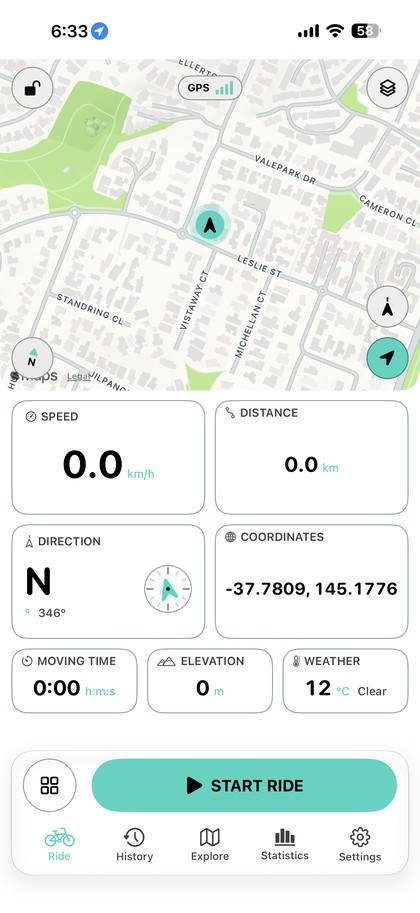
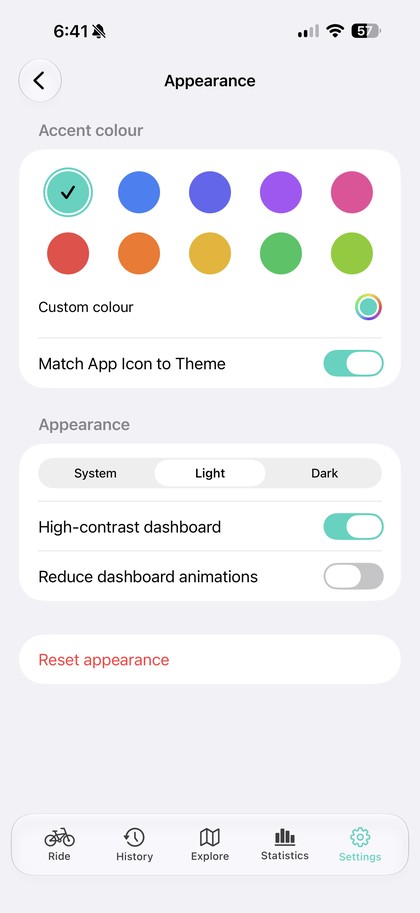
Every screenshot below is Live Ride running — nothing staged.
Map, GPS, speed, distance, direction, elevation and live weather — everything you need is on screen before you roll.
Every tile, every colour, every unit — Live Ride is built to be reconfigured until it's exactly yours.
Speed, average and max speed, pace, distance, elapsed/moving/paused time, elevation, ascent, descent, grade, heading, compass, coordinates, live weather, calories, and ready-to-use heart rate, cadence and power tiles.
Pick which tiles show and arrange them by hand. Choose small, medium or large tiles and three map sizes to match how you ride.
Save separate layouts for road, climbing, minimal or exploring — switch between them in one tap, or build your own from scratch.
Bad fixes, sudden jumps and stale points are rejected before they touch your stats, so distance and route lines stay clean.
Speed and elevation are smoothed so the numbers read naturally, with ascent and descent using hysteresis to ignore GPS noise.
A rolling-window grade calculation, clamped and smoothed, so climbs and descents read accurately without twitching.
Stops timing automatically at a red light or café stop and resumes the moment you're moving again — sensitivity is yours to tune.
Keeps tracking with the screen off or while you switch apps — pocket the phone and ride.
The display won't sleep mid-ride, so your dashboard is always glanceable.
A directional arrow and your route line, drawn in your own accent colour, on a clean full-screen map.
Heading and compass direction tiles, always available on the dashboard.
Build a round-trip or one-way route from any address with a target distance, or import a GPX file. Choose to avoid highways and toll roads, then follow it with on-map turn cues and optional spoken directions.
Every completed ride is saved on your device with a map thumbnail, distance, time and elevation at a glance.
Distance, moving time, average and max speed, ascent, descent and average grade, plus a full elevation profile.
Totals and personal records by week, month, year or all time, charted with your accent colour.
Set a weekly target for distance, time, climbing or ride count, and watch your progress fill in automatically as you ride.
Export any ride as a standard GPX file, or import routes from anywhere else — your data is never locked in.
Save every ride, route, preset and setting into one file you keep in Files, iCloud Drive or AirDrop, and restore it — even after a full reinstall. No account, no server.
Generate a shareable image of a finished ride — route, stats and all — straight from the app's own design.
Off by default. Turn it on to save rides as workouts and pull in heart-rate data recorded by your watch or strap.
Choose a preset or pick any colour you like — it flows through tabs, buttons, the route line and every chart. Turn on "Match App Icon to Theme" and your home-screen icon follows too.
Match your phone's appearance automatically, or lock in the mode you prefer.
Stronger borders and bolder text for bright sunlight or low-vision riding.
An option to calm dashboard animation for a simpler, steadier display.
Switch units at any time — every tile and chart reformats instantly.
Spoken distance, time and average-speed updates at whatever interval you set, plus turn cues when you're following a planned route — ducking your music briefly to speak.
Live Ride was built the way a cycling computer should work: you open it and it works. No forms to fill in before your first ride.
There's no sign-up screen, no email, no password and no login. Install the app and the first thing you do is ride.
Your first 10 rides are free. After that, one optional one-time purchase unlocks unlimited riding — for good. No trial that expires, no auto-renewing plan, no monthly charge.
Live Ride doesn't have a server. Rides, routes and stats live in on-device storage — export or share only when you choose to.
How it's funded: Live Ride Pro is a single, optional, non-consumable purchase through the App Store — not a subscription. It never expires and it's never billed again. Your existing rides and history are never locked behind it.
Read the purchase terms →Live Ride has no backend, no analytics SDK and no third-party trackers in its code. There's simply nowhere for your data to go unless you send it yourself.
No account to create, no plan to choose. Live Ride is free to download, with your first 10 rides on the house.